Best IPTV Player for Firestick in 2026: An Honest Comparison
Disclosure: We make Corteno Player Pro, one of the apps in this list. We've tried to be fair: for each player we say who it's really for, including when another app is a better fit than ours. Prices and availability are as of November 2026. Always check the official page before you pay.
Before we start: an IPTV player is just the app. None of the players below include channels or content. They play the M3U or Xtream Codes playlist you add. Only use playlists from sources that have the right to distribute the content.
Quick picks
| If you want… | Pick |
|---|---|
| The most powerful TV guide and recording on Android TV / Fire TV | TiviMate |
| To manage your playlists from a website and use the same app on Fire TV, Android and Windows | Corteno Player Pro |
| A free app that's easy to start with | IPTV Smarters Pro |
| Deep customisation and you don't mind complex menus | OTT Navigator |
| A MAC-activated app that also runs on Samsung and LG TVs today | IBO Player |
| A free, lightweight app focused on Xtream Codes | XCIPTV |
| Just to test whether a link works | VLC |
What we looked at
We compared every player on the things that matter on a Fire TV Stick:
- Setup. Is it in the Amazon Appstore, or do you need the Downloader app? How easy is it to enter a long playlist link with a remote?
- Playlist support. M3U links, M3U files, Xtream Codes, several playlists.
- TV guide (EPG) and catch-up. Is the guide easy to read? Can you watch past programmes when the provider supports it?
- Movies and series. Posters, seasons, resume.
- Remote control comfort. Fast zapping, clear focus, no tiny buttons.
- Performance on weaker sticks. Fire TV Stick Lite and 3rd gen have little memory.
- Price and platforms. Free, yearly plan or one-time payment? Which other devices does it run on?
Comparison table
| Player | Price model* | M3U | Xtream Codes | EPG | Catch-up | Manage playlists from a website | Other platforms |
|---|---|---|---|---|---|---|---|
| TiviMate | Free + Premium (yearly or one-time) | ✅ | ✅ | ✅ Advanced grid | ✅ | ❌ (companion app) | Android TV only |
| Corteno Player Pro | 7-day trial, then 5.99 € / 1 yr or 14.99 € Lifetime per device | ✅ link + file | ✅ | ✅ | ✅ | ✅ MAC + Device Key + QR | Android, Windows (LG webOS coming) |
| IPTV Smarters Pro | Free (+ optional paid features) | ✅ | ✅ | ✅ | ✅ | ❌ | Android, iOS, some Smart TVs, Windows |
| OTT Navigator | Free + Premium | ✅ | ✅ | ✅ | ✅ | ❌ | Android |
| IBO Player | Trial, then one-time fee per device | ✅ | ✅ | ✅ | ✅ | ✅ (by MAC) | Android, Samsung, LG, Windows |
| XCIPTV | Free | ✅ | ✅ | ✅ | ✅ | ❌ | Android |
| VLC | Free | ✅ | ❌ | ❌ | ❌ | ❌ | Everywhere |
*Check each official page for current prices.
1. TiviMate: the best TV guide for Android TV and Fire TV
What it is: a live-TV player built for Android TV with a TV-style programme guide.
Pros
- The most complete EPG grid of any player here, with good customisation.
- Recording, catch-up, several playlists, favourites groups.
- Very smooth on Fire TV Stick 4K / 4K Max.
Cons
- Focused on live TV. Movies and series are more basic than in VOD-focused apps.
- Android TV and Fire TV only: no Windows or iPhone version.
- Not in the Amazon Appstore, so you install it with Downloader.
- Premium features need a yearly plan or a one-time purchase.
Best for: people who mostly watch live TV on one Fire TV and want the richest guide.
2. Corteno Player Pro: best if you want to manage everything from the web
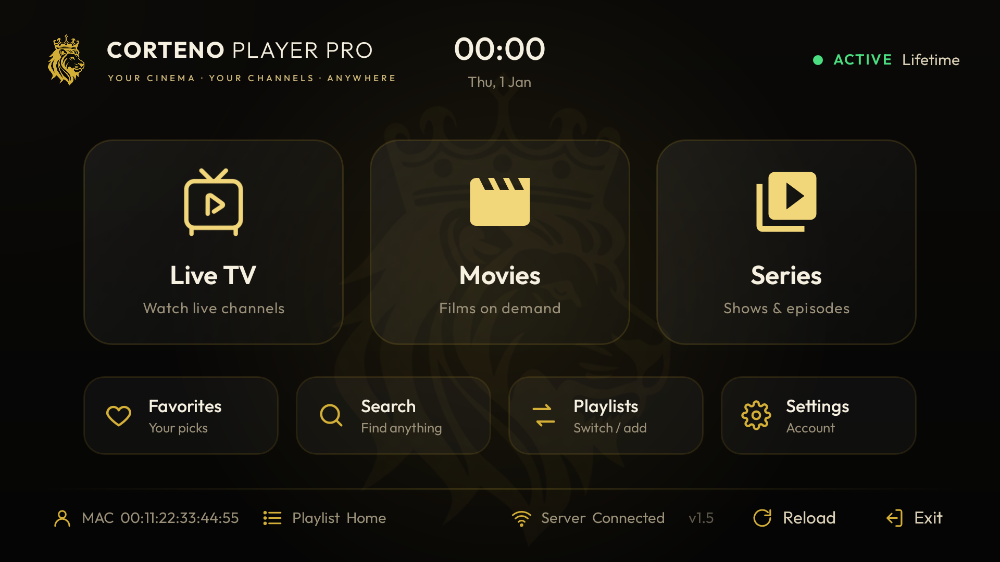
What it is: our media player for M3U and Xtream Codes playlists on Fire TV, Android TV, Android phones and Windows. An LG webOS version is in review.
Pros
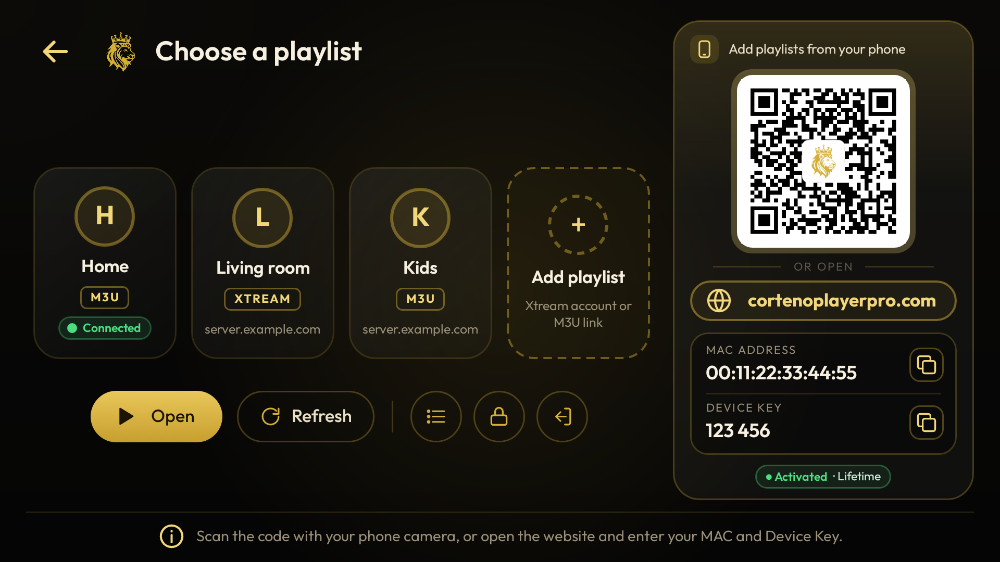
- Add and edit playlists from your phone or PC. Scan the QR code on the TV, or log in at cortenoplayerpro.com with the device's MAC address and 6-digit Device Key. No more typing long links with a remote.
- PIN-protected playlists: the link is hidden on the website, and nobody can change it without the PIN. There's also a separate parental PIN for adult (18+) groups.
- Live TV with a programme guide, catch-up when your provider supports it, movies and series with Continue watching, favourites and global search.
- Small download (3.5 MB). Designed for the remote, and runs well on Fire TV Stick Lite.
- One payment per device, with no automatic renewal: 5.99 € for 1 year or 14.99 € Lifetime, after a 7-day free trial with every feature.
- The app is in English, French, Arabic, German and Spanish.
Cons
- No recording (yet).
- No iPhone/iPad or Samsung Tizen version.
- Newer than the big names, so there are fewer community tutorials (we're writing them).
Best for: households with several devices and people who want to manage playlists from a phone or computer.
➡ How to install Corteno Player Pro on Firestick (code 1448164)
3. IPTV Smarters Pro: the familiar free choice
What it is: one of the most widely used players. Many providers send setup guides for it.
Pros
- Free to start, with a simple login screen for Xtream Codes and M3U.
- Available on many platforms, including iPhone.
- Lots of tutorials online.
Cons
- Several versions and look-alike apps make it hard to know which one is official. Only install from the official source.
- The interface feels heavier than newer players on low-memory sticks.
- Store availability on Fire TV varies by region and version.
Best for: beginners who want a free app and a familiar layout.
4. OTT Navigator: maximum control
What it is: a very configurable Android player.
Pros
- Huge number of settings: layouts, providers, guide sources, playback engines.
- Strong catch-up and EPG handling.
Cons
- The menus can overwhelm new users.
- The best features are in the paid version.
Best for: tinkerers who like to tune everything.
5. IBO Player: MAC activation on many TV brands
What it is: a player activated by device MAC address, with versions for Android, Samsung and LG TVs.
Pros
- Runs on many smart-TV platforms today.
- Playlists can be added through a web portal with the device's MAC and key.
- One-time fee per device after a trial.
Cons
- Several websites and app versions use the IBO name, which confuses users. Check you're on the official portal before entering your device details.
- Users regularly report the device key not showing.
Best for: people who need the same player on a Samsung or LG TV right now. Looking for something similar? See IBO Player alternative.
6. XCIPTV: light and free
Pros: free, lightweight, made for Xtream Codes logins, simple interface. Cons: fewer features and less polish. M3U support is more basic. Best for: a quick, free setup with an Xtream Codes login.
7. VLC: the tester
Pros: free and in the Amazon Appstore. It opens almost any stream or M3U link. Cons: not made for live TV: no proper guide, no series view, no favourites. Best for: checking whether a playlist link works before you set up a real player.
How to choose
Ask yourself three questions:
- Do you need recording? → TiviMate.
- Do you use more than one kind of device, or hate typing links with a remote? → Corteno Player Pro. Manage it all from the web, on Fire TV, Android and Windows.
- Do you want free and simple? → IPTV Smarters Pro or XCIPTV.
Also check your hardware. On a Fire TV Stick Lite or 3rd gen, a lighter app and a smaller playlist make a real difference. On a 4K Max, every player here runs smoothly.
How to install an IPTV player on a Firestick
Most players aren't in the Amazon Appstore, so the usual way is the Downloader app:
- Install Downloader from the Appstore.
- Go to Settings → My Fire TV → Developer options → Install unknown apps and switch Downloader ON.
- Open Downloader and enter the app's code or official link. For Corteno Player Pro the code is 1448164.
- Install, open and add your playlist.
Full walkthrough with screenshots and a video: Install Corteno Player Pro on Fire TV Stick.
A word about content
All these apps are media players. They're like a web browser for playlists. None of them provides channels, and none of them should be judged by "how many channels it has". If a website sells you a "player with thousands of channels included", it isn't selling a player. Use playlists only from sources that have the rights to the content.
FAQ
What is the best free IPTV player for Firestick?
IPTV Smarters Pro and XCIPTV are free to start, and VLC is free for testing links. TiviMate, OTT Navigator and Corteno Player Pro offer more features with a paid upgrade. Corteno has a 7-day free trial with everything unlocked.
Do IPTV players come with channels?
No. A player only plays the playlist you add (M3U link or file, or an Xtream Codes login). Corteno Player Pro provides no content.
Is TiviMate available on Windows?
No. TiviMate only runs on Android TV and Fire TV. If you want the same app on your PC and your TV, look at Corteno Player Pro or IPTV Smarters. See TiviMate for Windows? The best alternatives.
Which IPTV players support Xtream Codes?
All the dedicated players in this list do: TiviMate, Corteno Player Pro, IPTV Smarters Pro, OTT Navigator, IBO Player and XCIPTV. VLC doesn't. Xtream Codes vs M3U: which should you use?
Can I use the same player on Fire TV and on my PC?
Yes, with Corteno Player Pro, IPTV Smarters or IBO Player. Note that activation is usually per device: each Fire TV or PC has its own trial and activation.
Which player is best for a Fire TV Stick Lite?
Choose a light app and, if you can, an Xtream Codes login instead of a huge M3U file. Corteno Player Pro (3.5 MB) and XCIPTV are good lightweight options.
Want to try the one you can manage from your phone? Corteno Player Pro is free for 7 days on any Fire TV. Open Downloader and enter 1448164. Download Corteno Player Pro → · See prices →

Player only. Corteno Player Pro provides no channels, playlists or other content. Add your own playlist from a provider you are allowed to use.